Tech news 纯技术

Loading...

2009-1-13

Using firebug console on chrome extensions

When working on a firefox extension, you cannot use firebug console.log directly from your XUL chrome/overlay.js because the console belongs to the document window but in XUL, you get a XUL window.

The equivalent of a window in chrome overlay is the "content" but it is XPCNativeWrapper wrapped which hide all the javascript methods of an Object. We need to unwrap the content first before we can get a console. So to get the console instance, you need this:


DEBUG=false;
// Wrap firebug console.log
function log() {
if (!DEBUG) return;
var console = content.wrappedJSObject.console;
if (console.firebug) {
console.log.apply(console, arguments);
}
}

Safely_accessing_content_DOM_from_chrome

2008-6-9

Load arbitary module to any gtk+ applications
为任意 gtk+ 程序加载模块

gtk+ 图形库有一个特殊的环境变量,可以让你为任意的 gtk+ 程序加载模块,而不需要这个程序本身支持插件,或者扩展功能。只要在运行程序前,设定 GTK_MODULES 这个环境变量,让它指向所有需要加载的模块。而GTK_MODULES指定的模块,本身是符合 gtk 模块接口 的动态模块。

You can load arbitrary gtk modules/plugins to any gtk+ application without the application explicitly support gtk modules. All you need to do is set the environment variable GTK_MODULES to all the modules or plugins you want to load before starting the application. The modules are dynamic libraries compliant gtk module API.

2006-10-7

Mplayer Soft Volume
Mplayer 的软件音量控制

最近才意识到 mplayer 是有软音量控制的,就是说它的音量改变或者静音可以不影响其他软件的音量。有时候边听音乐边用 mplayer 的时候会希望暂时关掉它的音量,以前它会直接把音卡的音量关了,音乐也别听了。现在意识到可以在启动的时候加 -softvol 选项来使用软音量控制。这样静音的就只是 mplayer 本身,而不会影响到我的 QuodLibet 了。现在我把这个选项直接写到 ~/.mplayer/config 里了。

Just realized that you could have soft volume control when using mplayer. It seems that the function was already there since 2004. Well, I only found it just now. Now I can mute mplayer while listen to music with my QuodLibet. The option is -softvol for your curiosity.

2006-4-16

转载一个UPnP流程的分析文章

看到一个关于UPnP中控制点操作流程的东西,觉得说的挺清楚。对UPnP概念的初步理解很有帮助,比网上大量的UPnP协定,描述要容易上手的多了。挺旧的一篇文章,2004年的。


当然这是针对NAT穿透这种简单应用的流程描述,但是上手自然是越简单越好了。何况现在UPnP的应用大抵还是NAT穿透。


UPnP中Control Point的基本流程

2006-4-7

Istanbul: Record desktop on Linux
伊斯坦布尔:Linux下桌面录像


This is a gstreamer application writen in Python. It can be used to record desktop activities into a movie (Ogg Theora).


伊斯坦布尔是一款在Linux下记录桌面活动的程序。是用 Python + gstreamer 写的。结果存放在 Ogg Theora 格式的电影下。


http://live.gnome.org/Istanbul

2006-3-3

Put Chinese fonts in front of Japanese fonts in fontconfig
中文字型优先,日文字型靠后

On Debian systems, when both Chinese and Japanese fonts are installed, the Japanese fonts will have the priority being used in front of the Chinese ones. The result is that the Serif and Sans-Serif fonts will be totally messed with ugly Japanese glyphs under a Chinese locale. You would think that fontconfig can select the right fonts accroding the current locale. :(


The solution? Using a ~/.fonts.conf file to set Chinese font as the preferred one for Serif and Sans-Serif. Direct editing /etc/fonts/fonts.conf will has your settings reset on upgrade. For a system-wised customization, do it in /etc/fonts/local.conf, this is on a Debian box.


Another advantage on using ~/.fonts.conf is that you might have users using different locales (hint: Japanese) on the same box. You don't want to interfere with other people's fonts.


修改 ~/.fonts.conf 文件,提高中文字型在系统字型中的优先次序。
简单来说,/etc/fonts/fonts.conf 会先加载我们的 ~/.fonts.conf ,然后才设定系统字型(Serif, Sans-Serif)的组合字型的优先次序。我们先设定了,系统的就在我们屁股后面了。


Use the following command to find out fonts that fontconfig knows:

使用以下命令列出系统中的字型:


$ fc-list


<?xml version="1.0"?>
<!DOCTYPE fontconfig SYSTEM "fonts.dtd">
<!-- ~/.fonts.conf file to configure user font access -->
<fontconfig>
<alias>
<family>serif</family>
<prefer>
<family>Bitstream Vera Serif</family>
<family>AR PL ShanHeiSun Uni</family>
<family>AR PL ShanHeiSun Uni MBE</family>
</prefer>
</alias>

<alias>
<family>sans-serif</family>
<prefer>
<family>Bitstream Vera Sans</family>
<family>AR PL ShanHeiSun Uni</family>
<family>AR PL ShanHeiSun Uni MBE</family>
</prefer>
</alias>
<alias>
<family>monospace</family>
<prefer>
<family>Bitstream Vera Sans Mono</family>
<family>AR PL ShanHeiSun Uni</family>
<family>AR PL ShanHeiSun Uni MBE</family>
</prefer>
</alias>
</fontconfig>


We put the Bitsteam serie fonts in front of our Chinese fonts because we don't want to see westen alphabetic glyphs from our Chinese fonts.

2005-5-20

Python with Last-Modified-Time

Doing web programing sometime need to parse/create the Last-Modified-Time, Last-Modified-Since, or Date... values in the RFC2822 format. And I always forget the format string. Here we go:


>>> import time
>>> time.strftime("%a, %d %b %Y %H:%M:%S GMT", time.gmtime())
'Fri, 20 May 2005 11:08:40 GMT'
>>> t = time.strftime("%a, %d %b %Y %H:%M:%S GMT", time.gmtime(time.time()))
>>> t
'Fri, 20 May 2005 11:22:20 GMT'
>>> time.strptime(t, "%a, %d %b %Y %H:%M:%S GMT")
(2005, 5, 20, 11, 22, 20, 4, 140, -1)


So what these tell us? Well, the format string is:
"%a, %d %b %Y %H:%M:%S GMT"


That's it. Yes, it is GMT time, no timezone there.

2005-5-17

Scale Gstreamer Video with GTK+

改变 Gstreamer 视频在 gtk drawingarea 的大小,比例。


Spent days on how to let a gstreamer video sink know that the video window size was changed. Finally, I realized that I missed a line of code in totem that just did this.


In order to have the video in gstreamer respect the aspect ratio of a video, you have to put the video window (normally a gtk drawingarea) inside a gtk aspectframe. However, after the aspectframe is resized to follow the video aspect ratio, you have to call video_sink.expose() in order for the video sink to resize itself. I am using gstreamer python binding, of course. So many 'have to's that are not documented!


The expose() method is an method of interface GstXOverlay. So any video sink that implements the interface should have a expose() method (gstream name is gst_x_overlay_expose(xid). Sucks, huh?)

Debian: Find programs? 寻找程序包?

Since I'm talking about Debian tricks, here is one more trick on dealing with debian packages:

Looking for program:


Sometime, people tell you to use a command to solve your problem, but you don't have this command on your system, what you do you?


You can install apt-file and run:


user$ apt-file update
user$ apt-file search command_name

"update" will download/update package lists from the apt servers. "search" will search a filename from all the packages on the apt servers, even for the files that you did not installed on your system.


想知道一个命令或者一个文件在哪个程序包里吗?比如别人让你跑一个程序,但是你发现你的系统里没有这个程序,怎么办?你可以安装 apt-file这个程序,然后跑下面的命令:


user$ apt-file update
user$ apt-file search command_name


"update" 让 apt-file 从网上下载和更新所有程序包的内容,"search"让它在程序包里搜索一个文件名,这个文件名所在的程序包有没有安装无所谓。当然这个功能其他的几个 deb/apt 应用程序也可能有,不过我几年前开始用这个,用着顺手,就没有发掘新的程序了。


当然,如果你装了 synaptic ,可能什么窍门都不用了,它全包了。

Debian: Changelog before install? 升级前看看更新记录?

Before update a package on Debian, you might want to find out what have been changed in that package. Here is how I always do:


在 Debian 里升级一个程序包的时候,你可能会想知道这个包的最新的更新记录,看看它值不值得升级。有时候只是修改说明文件里的笔误,升级没意思。我一般这么做:


reportbug package:


user$ aptitude changelog reportbug


Yes, it is simple, but you might not know before I told you. And apt-listchanges is more powerful but it is an extra package to install.


虽然简单,我不说你却未必知道。apt-listchanges 更强大些,不过它得另装一个包。

2005-5-11

Python with Gstreamer

OK, so what if we use python and the playbin of gstreamer? Well, that can be done in a few lines:

player.py


#!/usr/bin/python
import sys, os.path
import pygtk; pygtk.require('2.0')
import gtk
import gst, gst.interfaces

def cb_eos(kele, data):
gtk.main_quit()
def cb_error(*args):
print args, args[2]

class Control:
def __init__(self, playbin, vsink,da):
self.fullscreen = False
self.play = playbin
self.vsink = vsink
self.da = da
def key_release(self, widget, event, *args):
if event.string in ['p', ' ']:
if self.play.get_state() == gst.STATE_PLAYING:
ret = self.play.set_state(gst.STATE_PAUSED)
else:
self.vsink.set_xwindow_id(self.da.window.xid)
ret = self.play.set_state(gst.STATE_PLAYING)
elif event.string == 's':
ret = self.play.set_state(gst.STATE_NULL)
elif event.string == 'q':
self.quit()
elif event.string == 'f':
if self.fullscreen:
widget.unfullscreen()
else:
widget.fullscreen()
self.fullscreen = not self.fullscreen
def quit(self, *args):
ret = self.play.set_state(gst.STATE_NULL)
gtk.main_quit()


def main():
fname = sys.argv[1]
absfname = os.path.abspath(fname)
uri = 'file://%s' % absfname

# Setup video/audio sink and playbin
vsink = gst.element_factory_make('xvimagesink')
asink = gst.element_factory_make('esdsink', 'asink')
playbin = gst.element_factory_make('playbin', 'playbin')
playbin.set_property('video-sink', vsink)
playbin.set_property('audio-sink', asink)
playbin.set_property('uri', uri)

playbin.connect('eos', cb_eos)
playbin.connect('error', cb_error)

win = gtk.Window(gtk.WINDOW_TOPLEVEL)
da = gtk.DrawingArea()
ctr = Control(playbin, vsink, da)
win.add(da)
win.connect('key-release-event', ctr.key_release)
win.connect('delete-event', ctr.quit)
win.show_all()
gtk.main()
playbin.set_state(gst.STATE_NULL)

if __name__ == '__main__':
main()
# vim:ts=8:sw=4:expandtab


You can just type


player.py test.avi


The key bindings are:


p or spacePlay/pause the movie
sStop the movie
fFullscreen/un-fullscreen
qQuit the program.


Note:


  • You have to import gst.interfaces for many methods to exist, e.g. xvimagesink.set_xwindow_id().

  • It seems that the binding between gstreamer video window and gtk+ window have to happens later. That's why we set_xwindow_id() before starting to play the movie.

  • You need to use a gtk.AspectFrame for keeping the aspect ratio of the movie.

2005-5-10

gstreamer lauch video!

OK, here after installed the gstreamer-ffmpeg on my Debian box from deb http://debian.ressukka.net/ unstable/ , I have to test it.


I use this gst-launch command for my test. First for this clip I have, I use mplayer to find out what the codecs were used. Well, it is a .avi with msmpeg4v2 video codec and mp3/mp2 mad audio codec. Since my mplayer already installed w32codecs, I'm all set. Now we are ready, here is the command I used to play the clip with gst-launch:


  • gst-launch filesrc location=test.avi ! ffdemux_avi name=demuxer ! { queue ! ffdec_msmpeg4v2 ! ffcolorspace ! xvimagesink } { demuxer. ! queue ! mad ! esdsink }


Some notes:

  • The elements used are:


    filesrc: load video file from source.
    ffdemux_avi: demux avi into streams, from the gstreamer-ffmpeg plugin.
    queue: Since we want to play both video and audio, need to use threads for video and audio playing at the same time. queue is used to bridge a thread to other threads.
    ffdec_msmpeg4v2: well, we want to play a msmpeg4v2 video.
    ffcolorspace: convert the decoded video stream into something our video display can understand.
    xvimagesink: we use xv as our video output devicde. Other options: sdlvideosink, ximagesink. Somehow, autovideosink don't work for me.
    mad: this element handle mp3 audio codec.
    esdsink: I use esd as audio output device. Of cause alsasink should work too, if it is not used by someone else.

  • There are 2 threads as denoted by the curly bracket {...}. Since we want to play the video and audio at the sametime, we put them together using the blocks.


    To make sure our audio links from the demuxer ffdemux_avi, we assign a name to that demuxer instant, "demux". At audio thread, we link it using the name "demux." to link with our audio decoder.


    Notice the Dot->. after the "demux". Because this "demux" is not a real element, it is a ghost element, so we tell gst-lauch about this by putting a dot(.) after "demux".


Wow, what a mess! How about make it simpler? We all know gstreamer can autodetect all those codecs. OK, the element that do the autodect is decodebin. So here we go:


  • gst-launch filesrc location=test.avi ! decodebin name=debin ! { queue ! xvimagesink } { debin. ! queue ! esdsink }


That's it! We don't even need to know all the codecs things. The element "playbin" does not work for me because its video-sink/audio-sink properties only take element objects as paramenters. Cannot do that with gst-launch.


Gstreamer with gstreamer-ffmpeg and w32codecs are fun.

2005-5-9

Compile python code? 编译蟒蛇程序?

You cannot but there are ways to hide your python code by compiling part of your program. How about a C program with a main() and use python's C API? Well,
pyrex
can do that.


All you have to do for a stand alone C program in Pyrex are:


cdef extern from "Python.h":
void Py_Initialize()
void Py_Finalize()
void PySys_SetArgv(int argc, char *argv[])

# Declare extension init function as a C function.
cdef public void initdemo()

# Define main() and declare it as "public"
cdef public int main(int argc, char *argv[]):
Py_Initialize() # Init Python environment
PySys_SetArgv(argc, argv) # Fill in sys.argv
initdemo() # Init our Pyrex generated main module.
# Do something here...
Py_Finalize() # When done, clean up Python env.


The following is a real example which actually do something. We use the re module to demostrate the power of python here:


demo.pyx:


cdef extern from "Python.h":
void Py_Initialize()
void Py_Finalize()
void PySys_SetArgv(int argc, char *argv[])

cdef extern from "stdio.h":
int printf(char *format, ...)

cdef public void initdemo()

def regex(msg):
import re
a = re.findall(r'as\w*', msg)
return a

cdef public int main(int argc, char *argv[]):
Py_Initialize()
PySys_SetArgv(argc, argv)
initdemo()
msg = 'Jump it as high as an ass, asshole!'
print 'Searching "as" from "%s"' % msg
m = regex(msg)
for i in m:
print 'Match:', i

cdef int count
count = len(m)
printf("Total: %d\n", count)
Py_Finalize()

# vim:ts=8:sw=4:expandtab


Makefile: Link with libpython.

all: demo

demo: demo.c
gcc -g -O2 -I/usr/include/python2.3 -lpython2.3 -o demo demo.c

demo.c: demo.pyx
pyrexc demo.pyx

.PHONY:
all


Run ./demo now will show you how things go. We hide everything in demo.pyx now!


As you can see, every C function that is used inside .pyx need to be explicitly declared in a cdef extern from "cheader.h": block. Other than that, Pyrex also cannot do list comprehension and generator. So do your generator or comprehension in a .py module and import to the .pyx.


And of cause if you don't write pure C inside .pyx, the resulting program will not be faster than a pure .py program.

2005-4-30

GtkDrawingArea and GtkScrolledWindow


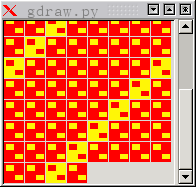
I saw some question asked about making flashget like progress window in gtk+. It can be simply realized using DrawingArea.


Then there is also the problem of scrolling the DrawingArea inside a ScrolledWindow. Well, this is simple. Just put a Viewport b/w the DrawingArea and the ScrolledWindow. Then do a set_size_request on the DrawingArea.


#!/usr/bin/python
import pygtk
pygtk.require('2.0')
import gtk

# 2 icons we use in our drawing area.
PICTNAME1="gdraw1.png"
PICTNAME2="gdraw2.png"
def load(pix):
'''Load GUI'''
win = gtk.Window()
gdraw = gtk.DrawingArea()
sw = gtk.ScrolledWindow()
sw.set_policy(gtk.POLICY_NEVER, gtk.POLICY_AUTOMATIC)
vp = gtk.Viewport()
sw.add(vp)
vp.add(gdraw)

win.add(sw)
win.resize(400, 200)
win.connect('delete-event', gtk.main_quit)
gdraw.connect('expose-event', expose_pix, pix)
win.show_all()

def expose_pix(gdraw, event, pix):
'''At expose event, actual draw graph.'''
pix1, pix2 = pix
gc = gdraw.window.new_gc()
pw = pix1.get_width()
ph = pix1.get_height()
geo = gdraw.window.get_geometry()
gw, gh = geo[2:4]
dx = dy = 0

# Draw 100 pixbuf on DrawingArea
for i in range(100):
if dx + pw > gw:
# Move down to the next line
dx = 0
dy += ph+1
if i % 7: # Draw a pix2 every 7 pix1
pixi = pix1
else:
pixi = pix2
gdraw.window.draw_pixbuf(gc, pixi, 0, 0,
dx, dy, pw, ph)
dx += pw+1
# Set the gdraw size request for Viewport
# to the height of our drawing.
gdraw.set_size_request(-1, dy+ph)

def main():
pix1 = gtk.gdk.pixbuf_new_from_file(PICTNAME1)
pix2 = gtk.gdk.pixbuf_new_from_file(PICTNAME2)
load((pix1, pix2))
gtk.main()

if __name__ == '__main__':
main()


Told you pygtk is very easy to program with.

2005-4-25

CoolStreaming on Linux?

Doing wine + coolstreaming on Linux is smooth. Go Linux!!


It's still proprietary but... It's not like writing an open source equivalent is hard. It's just that it is not easy to find reliable media sources. There! This's my excuse for using coolstreaming. :)

Abit NF7-S2 board ethernet Linux driver.

The NF7-S2 board from Abit has a buildin ethernet chip. This is a NForce2 board but they do not use Nvidia's NIC. The one I got has this ICPlus IP100A 10/100 ethernet chip on it. Found that out from Abit's China site. Of cause if you are not a Chinese, you are not gonna find it out because this piece of information won't appare on any other Abit sites. Anyway, Under Linux, lspci shows it as:


Ethernet controller: Sundance Technology Inc: Unknown device 0200 (rev 31)


So it is basically a Sundance Ethernet Chip. It turns out that the Sundance driver come with Linux 2.6.11 does not work with the chip. I have to download the ICPlus IP100A Linux driver from ICPlus's own site.


After 'make all' and copy the sundance.ko (Why do they still call it sundance.ko?) to /lib/modules/2.6.11-01/kernel/drivers/net/ , "modprobe sundance". dah dah..., one more NIC on this box. :)


So now we know that one revision of Abit NF7 S2 mainboard use ICPlus IP100A ethernet chip which shows up as Sundance chip.